



DryFlip logo DryFlip
EN
#1 Free Memecoin Simulator

Best Memecoin Paper Trading Simulator

DryFlip is the ultimate browser extension to paper trade memecoins on Axiom, GMGN, and Terminal (Padre) with virtual funds. No wallet, no losses – just smart practice.
100%
free
< 10s
to install
$0
real capital at risk

What is DryFlip?

DryFlip is a free memecoin paper trading simulator that runs as a browser extension. It puts a virtual trading panel on the token pages of Axiom, GMGN, Fomo and other terminals, so you can buy and sell at live prices with virtual funds.

  • Free browser extension for Chrome, Edge and Firefox
  • No wallet connection, no private keys, no seed phrase
  • No deposit: every balance is virtual
  • Works on Axiom, GMGN, Fomo and 11 more platforms
  • Multi-chain: Solana, BNB Chain (Binance), Ethereum, Base, Robinhood Chain and Arch
  • Orders: Take Profit / Stop Loss and Limit Buy / DCA
  • Tracking: trade journal, PNL calendar, custom PNL cards, live PNL widget, analytics and CSV export
  • Simulation only. Nothing here is financial advice

Why DryFlip?

Everything you need to practice the meme — minus the losses.

Real-Time Simulation

DryFlip fills paper buys and sells at the live price on the token page you have open, with DexScreener as a backup source. No real money moves.

Virtual Portfolio & PnL

Trade with virtual funds and watch your holdings, PnL and position update in real time. Top up or reset your balance whenever you like.

Axiom, GMGN, Fomo & More

One extension works across Axiom, GMGN and Fomo, plus 11 more terminals.

Learn Safely

No wallet connection, no private keys and no real transactions. Spot rugs, test strategies and build confidence before you risk real capital.

Trade Journal & Export

Add a note to any open or past trade inside the extension. Notes stay with the trade, and one click exports them with the trade details as a CSV file.

TP/SL, Limit Buy & DCA

Set paper take profit and stop loss levels, and place limit buys at target market caps to DCA into a position. Orders keep working while the tab is in the background.

Six Chains, Independent Wallets

Solana, BNB Chain, Ethereum, Base, Robinhood Chain and Arch each get their own paper wallet, so one chain’s results never mix with another’s.

Custom Fees, Slippage, Bribe & Delay

Set the priority fee, bribe and slippage tolerance for buys and sells, and add an execution delay of up to 5 seconds. Fees are deducted on every paper fill.

PNL Calendar, Cards & Live Widget

See daily realized PNL on a calendar, share custom PNL cards, and keep a floating live PNL widget on screen while you trade.

Analytics & Trade History

Win rate, total trades and running PNL per wallet, with a paginated log of every past trade.

On-Chart B/S Markers

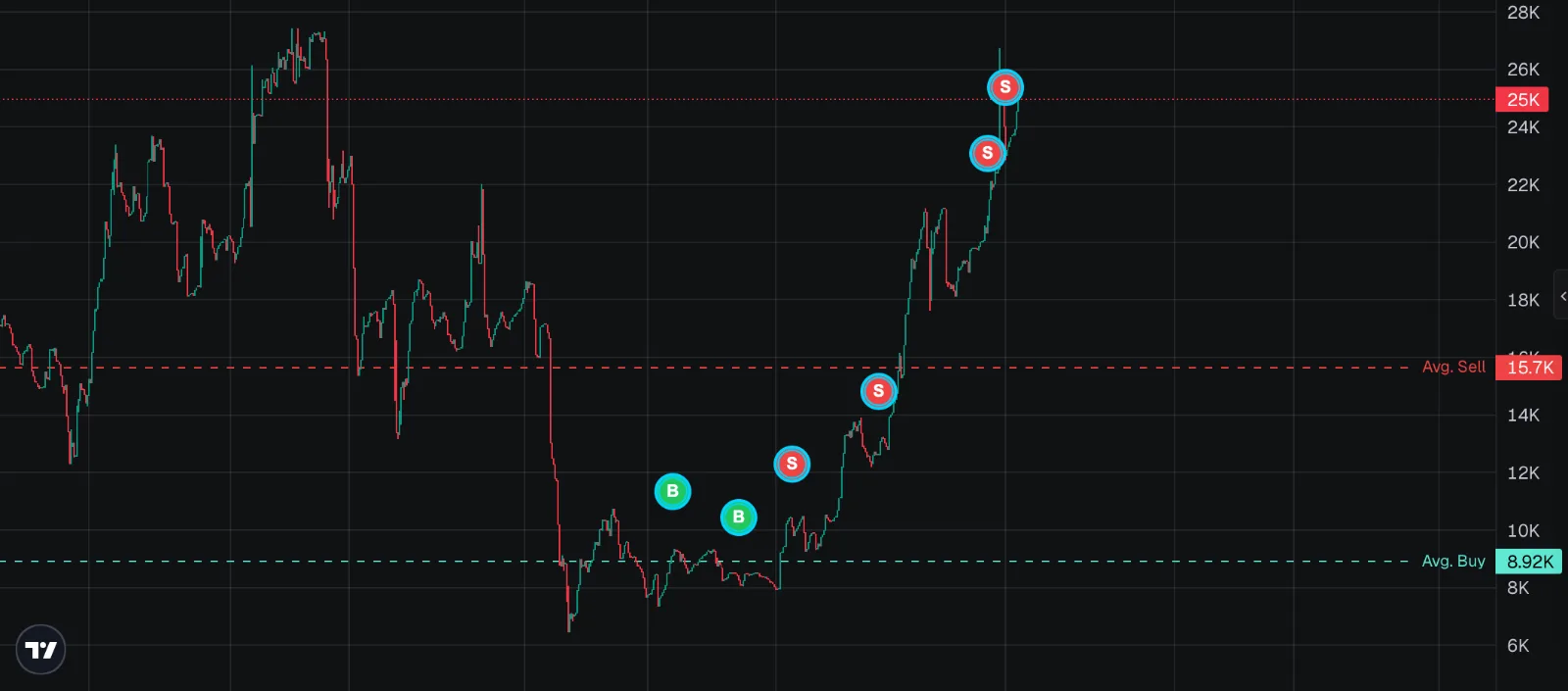
Every paper buy and sell is marked on the chart, with average buy and average sell lines showing where you stand.

25 Languages

Use DryFlip in English or 24 other languages. Switch any time in Settings.

axiom.trade

Axiom Paper Trading

DryFlip works as an Axiom trade simulator. It adds its own virtual trading widget to Axiom token pages, so you trade Axiom’s live prices with virtual funds and nothing is sent on-chain.

What you can do

  • Simulate buys and sells with DryFlip’s quick-buy and quick-sell presets or a custom amount.
  • See paper buys and sells as B/S markers on Axiom’s chart, with average buy and average sell lines.
  • Set Take Profit / Stop Loss and Limit Buy / DCA orders.
  • Turn on DryFlip’s Quick Buy button for token cards on Axiom Pulse.
  • Covers Solana, BNB Chain, Robinhood Chain and Arch tokens, each from its own paper wallet.

How to paper trade on Axiom with DryFlip

  1. Install DryFlip for Chrome, Edge or Firefox.
  2. Open axiom.trade. If Axiom asks you to sign in, an account with no funds is enough.
  3. Open any token page. The DryFlip widget appears over the chart.
  4. Buy and sell inside the DryFlip widget with virtual funds, and add take profit, stop loss or limit buys.

Good to know

  • Axiom’s own Buy and Sell buttons, presets, Instant Trade and Pulse quick buy work as usual. DryFlip does not change them, so they place real orders on a funded account.
  • For practice, use a separate, unfunded Axiom account. A misclick on a real button then cannot spend anything.
  • DryFlip adds no PAPER label to Axiom’s buttons. Check that you are clicking inside the DryFlip widget.
  • Fills and fees are estimates, and paper trades do not move Axiom’s candles. See limitations and accuracy.

New to this? Follow the step-by-step tutorial, or plan your exits with the memecoin profit calculator.

gmgn.ai

GMGN Paper Trading

DryFlip runs on gmgn.ai token pages, and GMGN is the platform DryFlip recommends. It suits Solana memecoins and pump.fun-style launches, where entries and exits happen fast.

What you can do

  • Simulate entries and exits at GMGN’s live price and track the position’s PnL as it moves.
  • Use Quick Buy from GMGN’s token listings to open a paper position in one click.
  • See chart markers for every buy and sell, with average buy and average sell lines.
  • Set Take Profit / Stop Loss and Limit Buy / DCA orders.
  • Works with Solana, BNB Chain, Ethereum, Base, Robinhood Chain and Arch tokens.

How to paper trade on GMGN with DryFlip

  1. Install DryFlip for Chrome, Edge or Firefox.
  2. Open gmgn.ai.
  3. Open any token page, or use Quick Buy on a token in GMGN's listings.
  4. Buy and sell inside the DryFlip widget with virtual funds, then review the trade in your history.

Good to know

  • DryFlip does not need a wallet connection or a deposit on GMGN.
  • GMGN’s own buy and sell controls are not changed by DryFlip and stay real. Paper trades happen only inside the DryFlip widget.
  • Quick Buy on listings is off by default. Turn it on in DryFlip’s Settings.
  • Results are estimates, and real fills, fees and slippage will differ. See limitations and accuracy.
fomo.family

FOMO Paper Trading

On fomo.family, DryFlip adds its widget to token pages. Trades run on a virtual dollar balance, so every amount is in USD.

What you can do

  • Trade straight from Fomo token pages with a virtual balance in dollars.
  • See your paper buys and sells marked on the Fomo chart, with average buy and average sell lines.
  • Track PnL for the open position and review closed trades in your history.
  • Set Take Profit / Stop Loss and Limit Buy / DCA orders.
  • Supports Fomo tokens on Solana, BNB Chain, Ethereum, Base and Robinhood Chain.

Getting started on Fomo

  1. Install DryFlip for Chrome, Edge or Firefox.
  2. Open fomo.family. If Fomo asks you to sign in, you do not need to deposit anything.
  3. Open any token page. The DryFlip widget appears with your virtual dollar balance.
  4. Buy and sell inside the DryFlip widget in USD, and track the position's PNL.

Good to know

  • No wallet connection and no deposit are needed.
  • Fomo has its own paper wallet in DryFlip, separate from your SOL, BNB and ETH wallets.
  • Fomo’s own buy and sell controls stay real. Only the DryFlip widget is simulated.
  • Simulated fills never touch Fomo’s chart or liquidity. See limitations and accuracy.
Memecoin chart with DryFlip paper trading B/S markers at the entry and exit prices, plus average buy and average sell lines
On-chart markers

See your trades on the chart

Your trades show up as B/S markers right on the chart, with average buy and average sell lines so you can see exactly where you stand.

Each marker is anchored to the market cap recorded when the paper order filled. Paper trades do not move the real candles: the chart stays the live market, and DryFlip only draws on top of it.

B Buy entries S Sell exits Avg Buy Avg Sell
Portfolio & Analytics

Know exactly how you’re trading

Track your win rate, total trades and running PNL in one dashboard, per wallet or across every chain, with a paginated history of every past trade.

Journal any trade inside the extension and export your notes with the trade details. A PNL calendar, custom PNL cards and a live PNL widget cover the rest.

Win rate Total PNL Trade history Trade journal CSV export Live PNL widget
PNL Calendar

Spot your best days & winning streaks

The PNL calendar shows your daily realized PNL for the month: green days, red days and your best green streak at a glance.

It works with your multi-chain paper wallets, so you can view one chain or all of them together and spot your rhythm.

Green day Red day Best streaks
Trade Journal

Remember why you took every trade

Add a note to any trade, open or closed, right from your trade history. Write down the plan, what you saw and how it played out, in up to 2,000 characters.

A note written while a position is open stays with the trade after it closes. When you want to review your decisions, download every note with its trade details as a spreadsheet file.

Open & closed trades Saved as you type CSV export
Shareable

Flex your gains with custom PNL cards

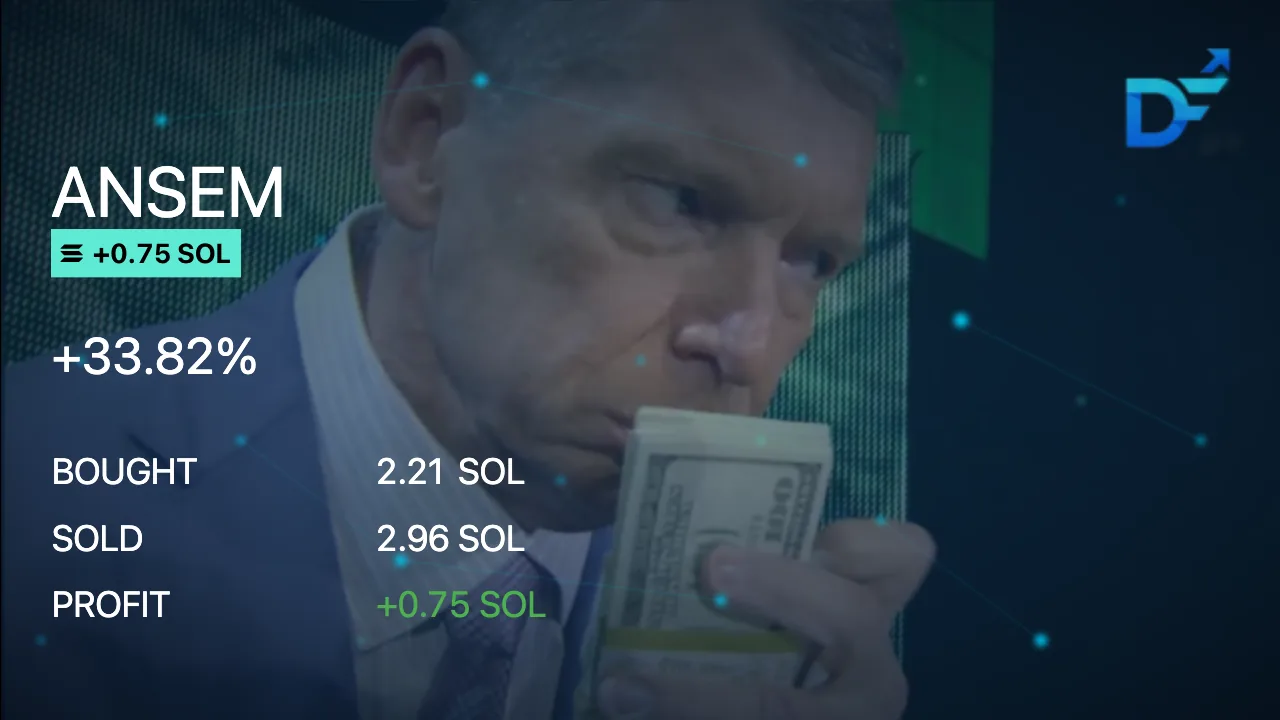
Close a winning paper trade and DryFlip builds a clean, shareable custom PNL card. Pick your background, show the result in SOL or USD, and share the win.
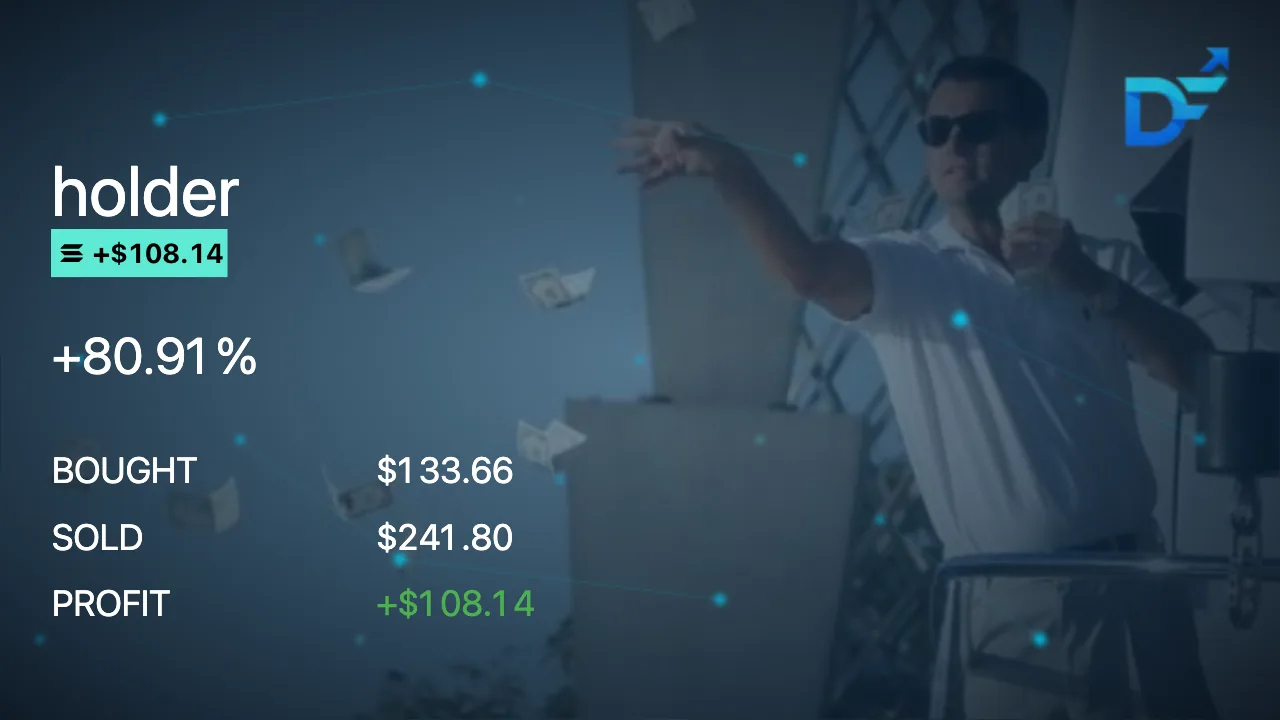

DryFlip custom PNL card for a paper trade — holder, +80.91%, bought $133.66, sold $241.80, profit +$108.14
DryFlip custom PNL card for a paper trade — Islands, +705.21%, bought 5.00 SOL, sold 40.26 SOL, profit +35.26 SOL
DryFlip custom PNL card for a paper trade — ANSEM, +33.82%, bought 2.21 SOL, sold 2.96 SOL, profit +0.75 SOL

Supported chains & paper wallets

DryFlip is multi-chain: one extension paper trades six chains, and each chain has its own independent paper wallet.

ChainPaper wallet currencyStarting virtual balance
SolanaSOL3 SOL
BNB Chain (Binance)BNB1 BNB
EthereumETH1 ETH
BaseETH0.1 ETH
Robinhood ChainETH1 ETH
ArchUSD$1,000

DryFlip picks the wallet from the token page you open. Fomo uses a separate dollar wallet that starts at $1,000. You can top up or reset any wallet, and view balances, history and the PNL calendar per wallet or all together.

DryFlip features at a glance

Everything below is included in the free extension.

FeatureDryFlipHow it works
Free browser extensionYesChrome, Edge and Firefox. Also works on Opera, Vivaldi and Brave
Multi-platformYesOne widget on 14 trading terminals, including Axiom, GMGN and Fomo
Virtual fundsYesA virtual balance per chain that you can top up or reset
No wallet connectionYesNo wallet, private keys, seed phrase or deposit
Live pricesYesThe price on the token page, with DexScreener as backup
B/S chart markersYesPaper buys and sells drawn on the platform’s chart
Average buy / sell linesYesLines at your average entry and average exit
Take Profit / Stop LossYesQuick levels or a custom %, sell part or all of the position
Limit Buy / DCAYesBuys at your target market cap; stack several to average in
JournalingYesA note on any open or past trade, saved as you type
PNL CalendarYesDaily realized PNL, green and red days, best green streak
Custom PNL cardsYesShareable card per trade, in SOL or USD
Live PNL widgetYesFloating card with balance and PNL, movable and resizable
AnalyticsYesWin rate, total trades and running PNL
Past trade historyYesPaginated log of every closed trade
Export journal / historyYesCSV of every note with its trade details
Multi-chainYesSolana, BNB Chain, Ethereum, Base, Robinhood Chain, Arch
Independent wallets per chainYesOne paper wallet per chain, plus a dollar wallet for Fomo
Custom fees / slippage / bribeYesSet separately for buys and sells
Custom delay executionYesFixed delay from 0 to 5 seconds
Multi-languageYes25 languages

DryFlip vs a basic simulator vs real trading

Where paper trading with DryFlip sits between a simple practice tool and trading with real funds.

DryFlipBasic simulator or spreadsheetReal trading
Fees counted on every fillYes, simulated from your fee settingsOften left outYes, real network and platform fees
Real-time pricesYes, on the live token pageVaries by toolYes
Markers on the chartYes, B/S markers and average linesUsually notDepends on the terminal
TP/SL and Limit Buy / DCAYes, as paper ordersVaries by toolDepends on the terminal
Journal and exportYes, built inManualDepends on the terminal
Multi-chainSix chains, separate paper walletsVaries by toolOne funded wallet per chain
Wallet riskNone: no wallet is connectedNoneReal funds at risk
Limitations disclosedYes, listed on this pageVaries by toolNot applicable

How To Use DryFlip

From install to your first virtual trade — no signup, no wallet.

  1. Install DryFlip

    Add DryFlip for free from the Chrome Web Store, Edge Add-ons or Firefox Add-ons. It takes less than 10 seconds.

  2. Visit Axiom, GMGN or Fomo

    Open a token page on Axiom, GMGN, Fomo or another supported platform. The DryFlip widget appears automatically.

  3. Simulate Buys and Sells

    Use the DryFlip overlay to buy and sell with virtual funds at live prices. Add take profit, stop loss or limit buys when you want them.

  4. Track, Journal and Export

    Track your PNL, journal your trades, export your notes and history, and reset anytime.

Paper trade on your favorite platforms

DryFlip adds its widget to the token pages of the terminals you already use.

What DryFlip simulates, and what it does not

Paper trading limitations and accuracy, stated plainly. DryFlip uses live prices and virtual funds, and its results are estimates of what real trading would do.

What DryFlip simulates

  • Buys and sells at the live price shown on the token page.
  • A virtual balance for each chain. No deposit is needed.
  • Your priority fee and bribe, deducted on every paper fill.
  • An optional execution delay, with the trade cancelled if the price moves past your slippage tolerance.
  • Take profit, stop loss and limit orders, filled at or near the order’s level.

What it does not reproduce

  • Paper trades do not move real candles. Nothing is sent on-chain.
  • Fills and fees are estimates, not a guarantee of real execution.
  • Slippage, price impact and latency are not reproduced exactly. Your own order size does not move the price.
  • Failed transactions, network congestion and sandwich attacks are not modelled.
  • Orders are checked only while your browser is running, about every 30 seconds for tabs you are not viewing.

Before you click

  • DryFlip is not a wallet security layer. It does not block a platform’s own buttons.
  • If Axiom or another platform changes its page, or DryFlip is switched off, real trading controls can still work.
  • DryFlip adds no PAPER label to those buttons. Check that you are clicking inside the DryFlip widget.
  • You do not need to connect a real wallet. On platforms that require sign-in, such as Axiom, use a separate, unfunded account for practice.
  • Paper results do not predict real results, and nothing here is financial advice.

Safety & privacy

DryFlip is built so that practising cannot cost you money: there is no wallet to connect and no transaction to sign.

  • No wallet connection is required, ever
  • No private keys or seed phrases are requested or stored
  • No real transactions: DryFlip does not execute blockchain transactions for paper trades
  • Virtual funds only, with no deposit
  • Your data stays with you: it is stored primarily in your browser
  • Not a wallet security layer: the platform’s own trading controls stay real
  • Check where you click: only the DryFlip widget is simulated
  • If DryFlip is off or a platform such as Axiom changes, real trading controls can still work

Read the full privacy policy, or ask a question in the free DryFlip community.

Frequently Asked Questions

Is DryFlip free?
Yes. DryFlip is free to install and use on Chrome, Edge and Firefox. There are no subscriptions or hidden fees.
Is DryFlip safe?
Yes. DryFlip is a simulator: it records practice trades and never touches real funds. It does not ask you to connect a wallet, enter a private key or seed phrase, or make a deposit, and your trades and settings are stored in your browser. Install it only from the Chrome Web Store, Edge Add-ons or Firefox Add-ons links on dryflip.com. The one thing to watch is the trading platform itself: its own Buy and Sell buttons stay real, so practise on an account that holds no funds.
Is DryFlip a drainer?
No. A wallet drainer steals funds by getting you to connect a wallet and approve a transaction or signature, or by capturing your seed phrase or private key. DryFlip does none of these. It has no wallet connection, never opens a signature or approval request, and has no place to enter a seed phrase or private key. It contains no code that talks to Phantom, MetaMask or any other wallet, and a browser extension cannot read the keys another extension stores. Funds can only leave a wallet through a transaction signed with its key, and DryFlip never has that key and never asks you to sign anything. A buy or sell in DryFlip is only a record saved in your browser. Download DryFlip only from the official store listings linked on dryflip.com, because a copy from anywhere else is not DryFlip.
Do I need to connect my wallet?
No. DryFlip never asks you to connect a wallet, enter a private key or seed phrase, or deposit funds. Every balance in DryFlip is virtual.
What platforms are supported?
DryFlip supports Axiom, GMGN and Fomo first, and also works on Terminal (Padre), Trojan, Telemetry, Photon, Jupiter, Azura, Definitive, Shotgun, Trenchers, Cielo and Dexscreener. GMGN is the recommended platform.
Does DryFlip work on Axiom?
Yes. DryFlip works as an Axiom paper trading extension: it adds its own virtual trading widget to token pages on axiom.trade. Paper buys and sells show up as B and S markers on Axiom's chart with average buy and average sell lines, and DryFlip can add a Quick Buy button to Pulse. Axiom's own Buy and Sell buttons are not changed and still place real trades.
Which chains are supported?
DryFlip supports six chains: Solana, BNB Chain (Binance), Ethereum, Base, Robinhood Chain and Arch. Which of them you can trade depends on the platform you have open.
How accurate is the simulation?
DryFlip is a realistic estimate, not a copy of real execution. It fills paper orders at the live price shown on the token page and applies your fee settings and optional execution delay. It does not reproduce price impact, failed transactions or network latency, so real fills and fees can differ.
Can I use Take Profit, Stop Loss, Limit Buy and DCA?
Yes. DryFlip has paper take profit and stop loss orders and limit buys. To DCA, place one or more limit buys at the market caps where you want to add, and each fill averages into your position. Orders are checked while your browser is running, including when the tab is in the background.
Can I journal trades and export my history?
Yes. You can add a note to any open or past trade inside the extension, and the note stays with the trade when it closes. The Notes button exports every note with its trade details (date, token, platform, wallet, amounts and PNL) as a CSV file.
Where is my data stored?
Your trades, balances and settings are stored primarily in your browser, in the extension's local storage. It is not synced between browsers or devices, and removing the extension or clearing its data deletes it.
Free Community

Free DryFlip Community

Join on Whop for free memecoin courses, trade breakdowns, and live discussions with other traders.

Join the Free Community →